Best aaPanel Settings for 1GB VPS (Full Optimization Guide – 2026)
Running a 1GB VPS?
If not configured properly, your server will:
❌ Hit 100% CPU
❌ Crash during traffic
❌ Show 502 / 500 errors
❌ Freeze under small spikes
If you’re using:
This guide shows the exact stable configuration for 2026.
—
🧠 Why 1GB VPS Is Sensitive
With 1GB RAM:
Apache alone can consume 400MB+
MySQL defaults are too high
Too many PHP workers crash the server
No swap = instant shutdown
Goal:
✔ Keep RAM usage under 700MB
✔ Avoid swap overuse
✔ Maintain CPU below 60%
—
🟢 1️⃣ Use Nginx Instead of Apache
4
Apache is heavy for 1GB VPS.
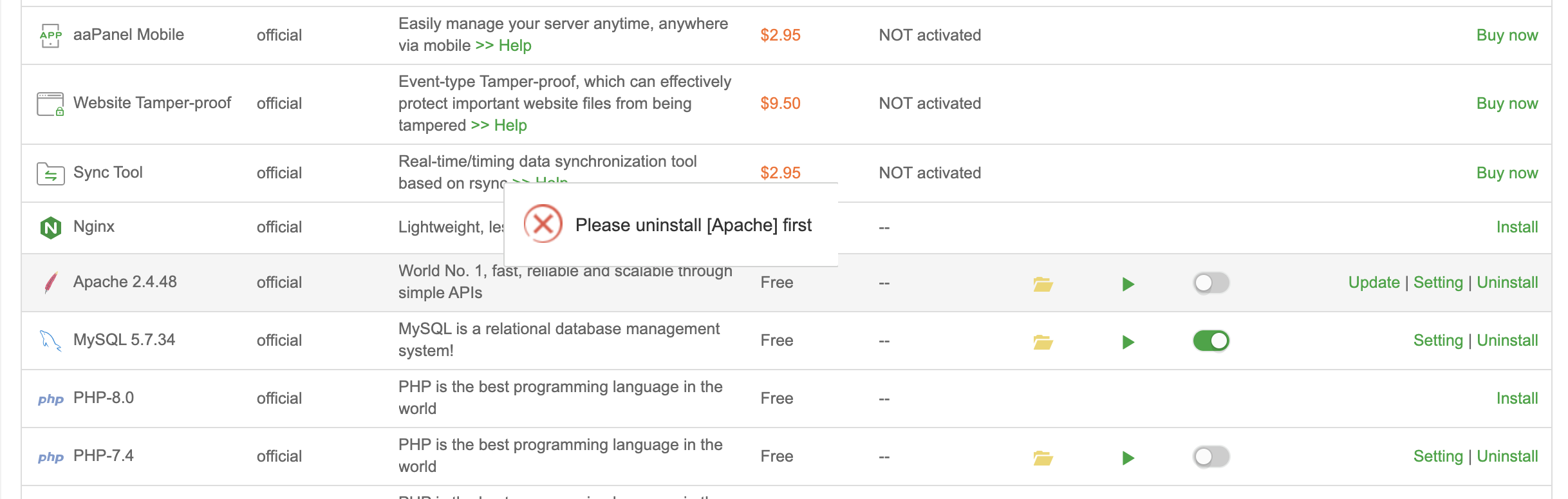
Inside aaPanel:
App Store → Install Nginx
Disable Apache.
Result:
✔ Lower RAM usage
✔ Better concurrency
✔ Reduced CPU spikes
—
🟢 2️⃣ Optimize PHP-FPM Settings
Inside aaPanel → PHP → Settings:
Use this for 1GB VPS:
$$
pm = dynamic
pm.max_children = 8
pm.start_servers = 2
pm.min_spare_servers = 2
pm.max_spare_servers = 4
$$
Reduce memory limit:
$$
memory_limit = 256M
$$
Too many PHP workers = memory exhaustion.
Restart PHP after changes.
—
🟢 3️⃣ Enable OPcache (Mandatory)
Inside PHP Extensions:
Enable:
✔ OPcache
OPcache reduces repeated PHP processing → saves CPU & RAM.
—
🟢 4️⃣ Install Redis (Major Performance Boost)
Redis dramatically reduces database load.
Inside aaPanel:
App Store → Install Redis.
If using WordPress:
Enable Redis object cache plugin.
This prevents repeated MySQL queries.
—
🟢 5️⃣ Optimize MariaDB / MySQL
Inside Database → Config:
Recommended safe settings:
$$
innodb_buffer_pool_size = 128M
key_buffer_size = 32M
max_connections = 30
query_cache_size = 16M
$$
Default values are too high for 1GB VPS.
Restart database after change.
—
🟢 6️⃣ Create 1GB Swap File
Without swap → server crashes under load.
Create swap:
$$
fallocate -l 1G /swapfile
chmod 600 /swapfile
mkswap /swapfile
swapon /swapfile
$$
Add to /etc/fstab for persistence.
Swap prevents emergency crashes.
—
🟢 7️⃣ Enable Gzip in Nginx
Inside Nginx config:
$$
gzip on;
gzip_types text/plain text/css application/json application/javascript;
$$
Reduces bandwidth and CPU processing.
—
🟢 8️⃣ Limit Cron Jobs
Inside aaPanel → Cron:
Avoid:
$$
Every minute
$$
Use:
$$
Every 5–10 minutes
$$
Frequent cron spikes CPU.
—
🟢 9️⃣ Protect With Cloudflare
If using:
Enable:
✔ Full (Strict) SSL
✔ Bot protection
✔ Rate limiting
Bots can overload a 1GB VPS quickly.
—
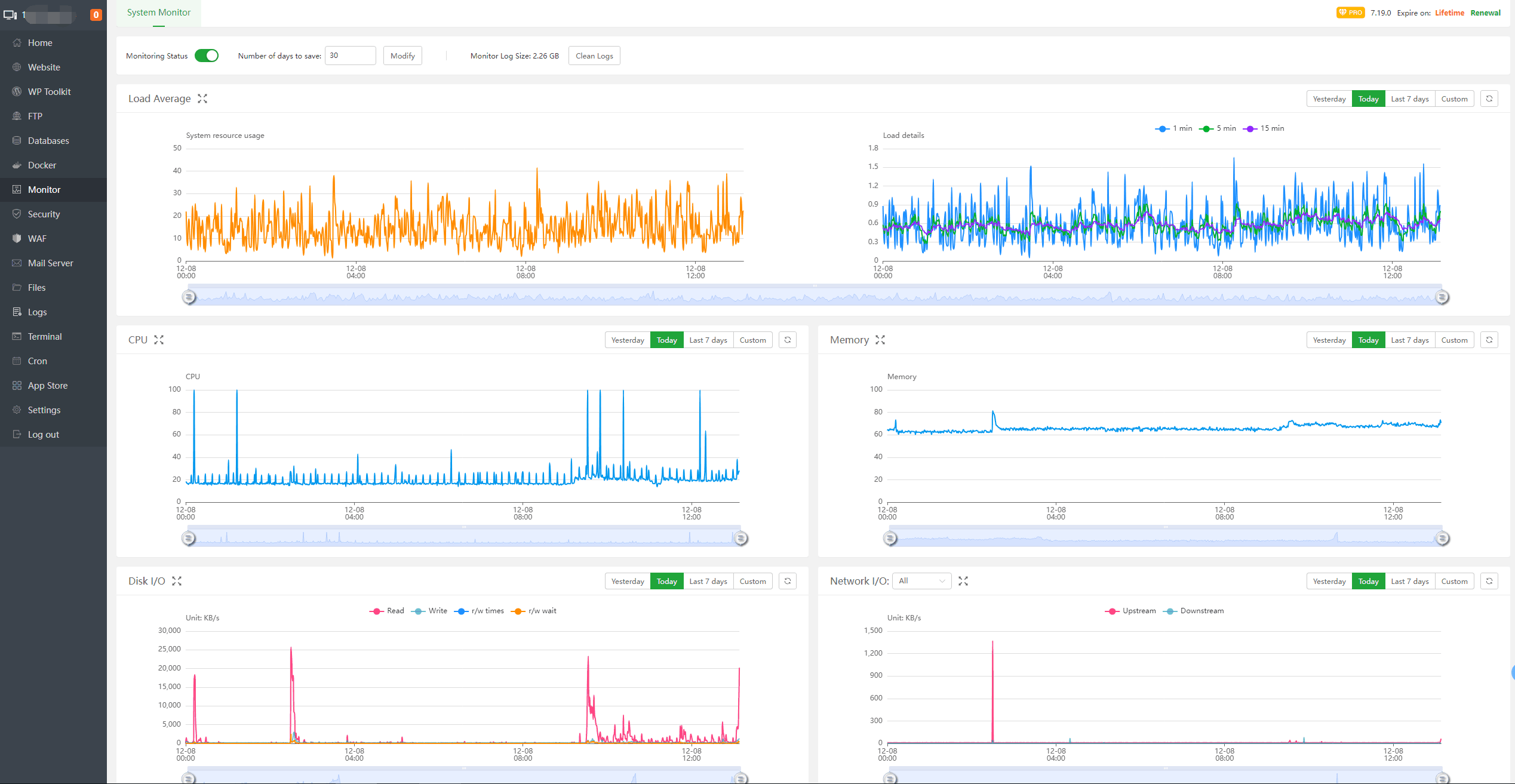
🟢 🔟 Monitor Resource Usage
Use:
Dashboard → Monitor
Or via SSH:
$$
top
htop
$$
Healthy idle values:
✔ RAM: 400–600MB used
✔ CPU: under 20% idle
✔ Load average: below 1.0
—
🔥 Ideal 1GB VPS Stack (2026)
✔ Nginx
✔ PHP 8.1
✔ OPcache enabled
✔ Redis enabled
✔ MariaDB optimized
✔ 1GB swap
✔ Cloudflare protection
Avoid:
❌ Apache + heavy plugins
❌ High MySQL buffers
❌ Unlimited PHP workers
—
⚡ Full Optimization Checklist
| Setting | Recommended |
|---|
| Web Server | Nginx |
| PHP Version | 8.1 |
| max_children | 8 |
| Memory Limit | 256M |
| OPcache | Enabled |
| Redis | Installed |
| MariaDB buffer | 128M |
| Swap | 1GB |
| SSL | Let’s Encrypt |
| CDN | Cloudflare |
—
🚀 When to Upgrade
Upgrade to 2GB if:
✔ Running WooCommerce
✔ High traffic
✔ Multiple sites
✔ Large database
1GB is ideal for:
✔ Forum
✔ Blog
✔ Small business site
✔ Landing page
—
Web Development #aaPanel #1GBVPS #VPSOptimization #ServerPerformance #Nginx #Cloudflare #WebHosting

