aaPanel PHP Version Conflict Fix (Website Not Loading) – 2026 Guide
Is your website:
❌ Showing blank page (white screen)?
❌ Returning 500 Internal Server Error?
❌ Showing “This site can’t be reached”?
❌ Crashing after PHP update?
If you’re using:
This guide will help you fix PHP version conflicts properly.
—
🚨 What Is a PHP Version Conflict?
A PHP version conflict happens when:
✔ Your website requires a specific PHP version
❌ But aaPanel is running a different one
Example:
—
🧠 Common Symptoms
You may see:
$$
Fatal error: Uncaught Error
Parse error: syntax error
Undefined function
Call to undefined method
$$
Or simply a blank page.
—
✅ Step-by-Step Fix (2026 Method)
—
🟢 STEP 1: Check Current PHP Version
Inside aaPanel:
Website → Settings → PHP Version
Note which version is active.
—
🟢 STEP 2: Check Website PHP Requirements
Common PHP requirements (2026):
| Platform | Recommended PHP |
|---|
| WordPress | 8.1 |
| Laravel | 8.1+ |
| Joomla | 8.0+ |
| Old CMS | 7.4 |
If mismatch → change version.
—
🟢 STEP 3: Switch PHP Version in aaPanel
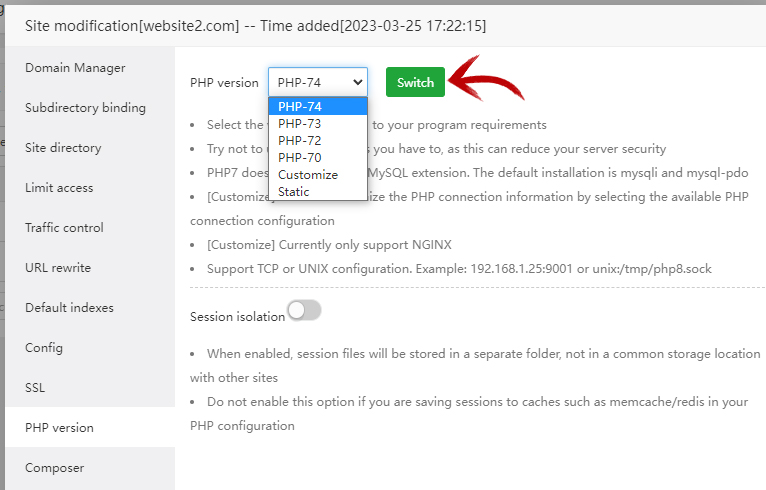
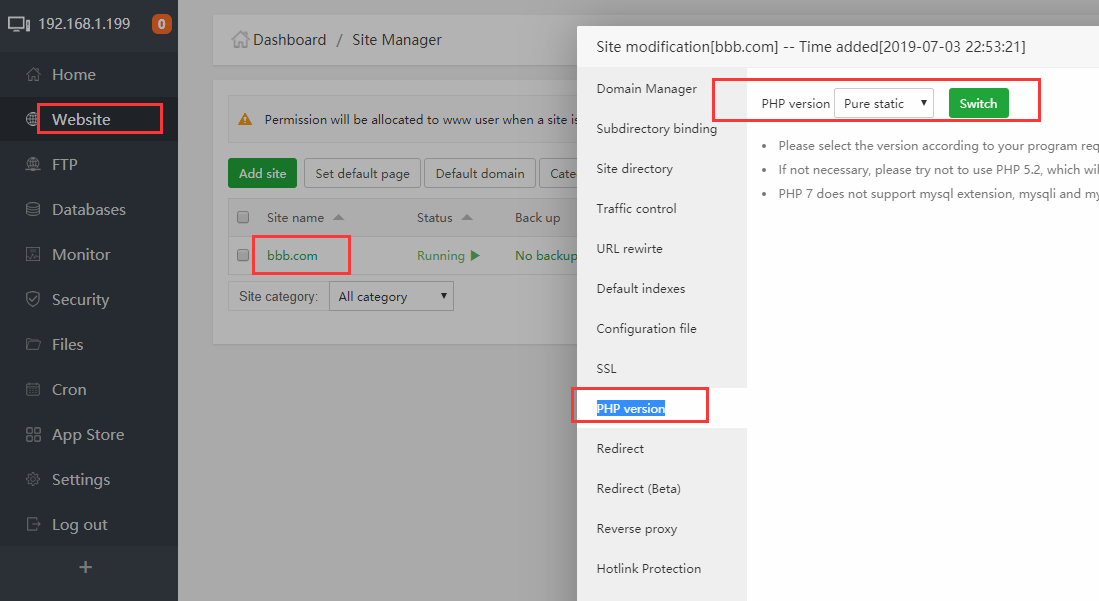
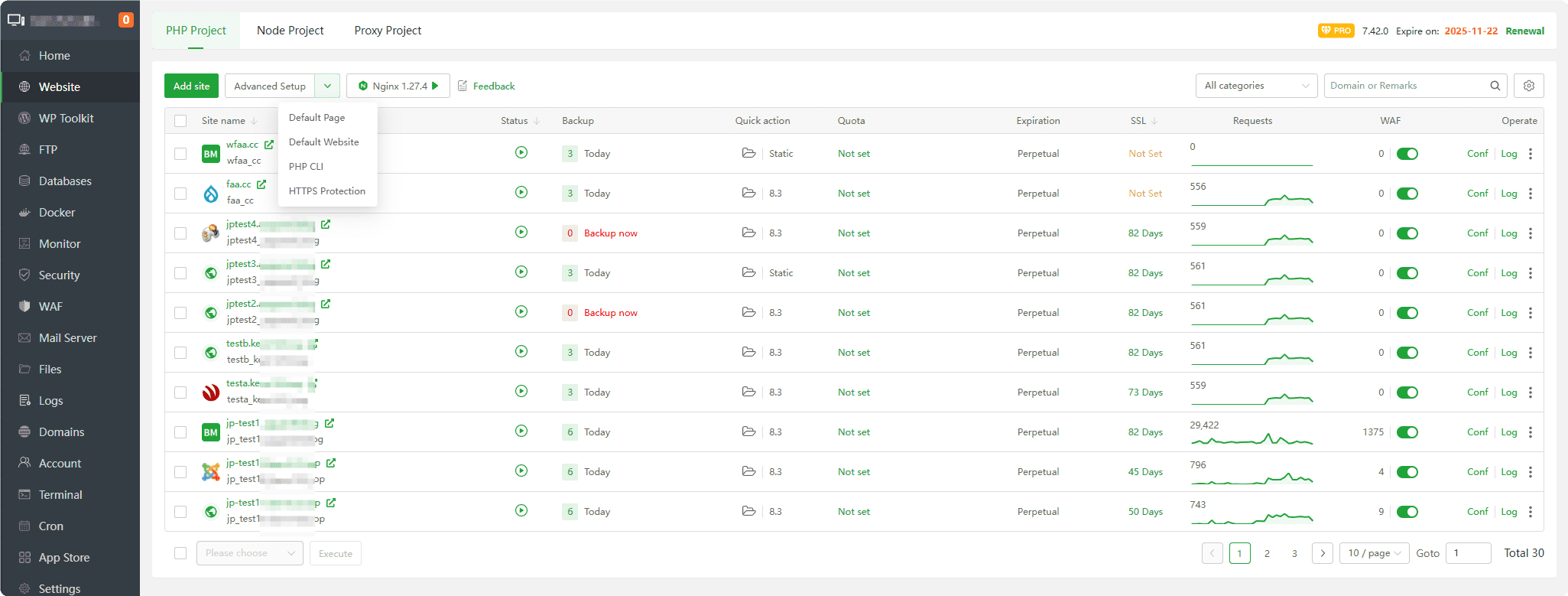
4
In aaPanel:
Go to Website
Click your domain
Change PHP version
Save
Restart PHP
If version not installed:
App Store → Install desired PHP version first.
—
🟢 STEP 4: Enable Required PHP Extensions
Sometimes the issue is not version — but missing extension.
Inside PHP settings → Extensions:
Enable common required modules:
✔ mysqli
✔ pdo_mysql
✔ curl
✔ mbstring
✔ fileinfo
✔ openssl
✔ gd
Restart PHP after enabling.
—
🟢 STEP 5: Increase PHP Limits
Low limits can crash site.
Recommended for 1GB VPS:
$$
memory_limit = 256M
max_execution_time = 300
upload_max_filesize = 64M
post_max_size = 64M
$$
Restart PHP.
—
🟢 STEP 6: Check Error Logs
Inside aaPanel:
Website → Logs
Or via:
$$
/www/wwwlogs/yourdomain.com.log
$$
Look for:
PHP Fatal error
Missing extension
Deprecated function
Parse error
Logs reveal exact issue.
—
🔎 If Website Still Not Loading
Try:
✔ Disable plugins (WordPress)
Rename:
$$
wp-content/plugins
$$
✔ Clear OPcache
✔ Restart Nginx
✔ Restart MySQL
—
⚡ Special Case: After Cloudflare Setup
If using:
Ensure:
✔ SSL mode = Full (Strict)
✔ No caching errors
✔ Clear cache after PHP change
Sometimes caching hides actual PHP errors.
—
🔥 Best PHP Setup for aaPanel (2026)
For most websites:
✔ PHP 8.1
✔ OPcache enabled
✔ Nginx
✔ Redis enabled
✔ MariaDB optimized
Avoid outdated PHP 7.2 or 7.3.
—
⚡ Quick Fix Checklist
| Check | Done |
|---|
| PHP version verified | ✅ |
| Correct version installed | ✅ |
| Required extensions enabled | ✅ |
| PHP limits increased | ✅ |
| Logs checked | ✅ |
| Cache cleared | ✅ |
| Services restarted | ✅ |
—
🚀 When To Downgrade PHP?
If older website breaks under 8.1:
Temporarily downgrade to:
$$
7.4
$$
Then update plugins and themes before upgrading again.
—
#aaPanel #PHPError #VPSHosting #WebHosting #ServerFix #Cloudflare #HostingHelp

