aaPanel PHP Version Conflict Fix (Website Not Loading)
After updating PHP, your site:
❌ Shows blank page
❌ Shows 500 error
❌ Plugins stop working
❌ Displays deprecated warnings
This is usually PHP version conflict.
—
🚨 Why PHP Conflicts Happen
✔ Site built for PHP 7.4
✔ Server running PHP 8.2
✔ Missing extensions
✔ Deprecated functions
✔ Framework incompatibility
—
✅ Fix Steps
—
🟢 1. Switch PHP Version
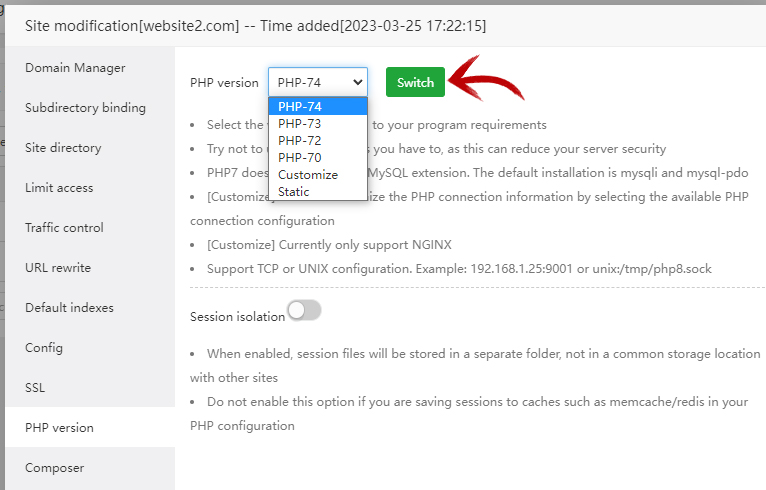
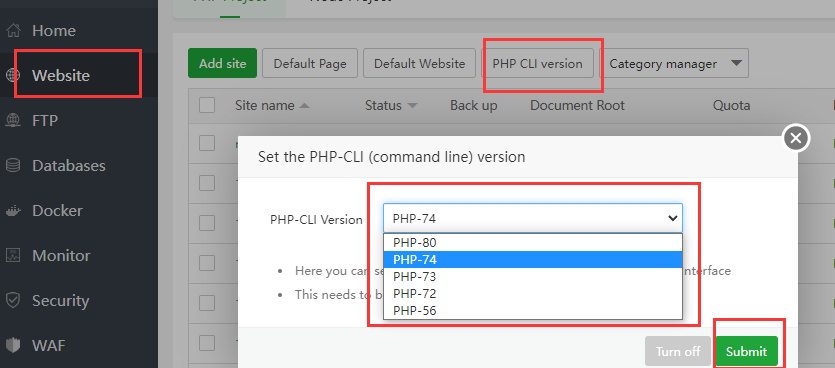
4
Inside aaPanel:
Website → Settings → PHP Version
Try:
Restart PHP.
—
🟢 2. Enable Required Extensions
Enable:
✔ mbstring
✔ mysqli
✔ curl
✔ openssl
✔ pdo_mysql
—
🟢 3. Disable Error Display (Production)
In PHP config:
$$
display_errors = Off
$$
—
🟢 4. Check Logs
$$
/www/wwwlogs/yourdomain.com.log
$$
Look for:
Deprecated function
Undefined constant
Syntax error
—
🔥 Recommended PHP Setup (2026)
✔ PHP 8.1
✔ OPcache enabled
✔ memory_limit = 256M
✔ max_execution_time = 300
—
#aaPanel #SSLError #DatabaseFix #PHPFix #VPS #WebHosting #ServerTroubleshooting

