How To Fix aaPanel SSL Certificate Not Valid in Gmail (Port 465 Error) – 2026 Guide
Are you getting this error in Gmail?
❌ “Certificate not valid”
❌ “Server identity cannot be verified”
❌ SSL handshake failed (Port 465)
If you’re using:
And trying to connect Gmail using SMTP Port 465 — this guide will fix it properly.
—
🚨 Why Gmail Shows “Certificate Not Valid” on Port 465
Gmail is strict about SSL security.
This error usually happens because:
❌ You installed SSL only for yourdomain.com
❌ But Gmail connects to mail.yourdomain.com
❌ SSL hostname mismatch
❌ Self-signed certificate
❌ Missing reverse DNS (PTR)
❌ Using server IP instead of hostname
Even ONE of these causes Gmail to reject the connection.
—
🧠 Understand the Root Problem
Example:
You configure Gmail with:
$$
SMTP Server: mail.yourdomain.com
Port: 465
SSL: Enabled
$$
But your certificate is issued only for:
$$
yourdomain.com
$$
Result:
🔐 Certificate Common Name (CN) mismatch → Gmail blocks it.
—
✅ Step-by-Step Fix (2026 Method)
—
🟢 STEP 1: Create Proper Mail Subdomain (DNS)
In your DNS provider (e.g., Cloudflare):
Add:
$$
Type: A
Name: mail
Value: YOUR_SERVER_IP
Proxy: DNS Only (Important)
$$
⚠ If using Cloudflare:
Set mail record to DNS Only (Grey Cloud) — not proxied.
—
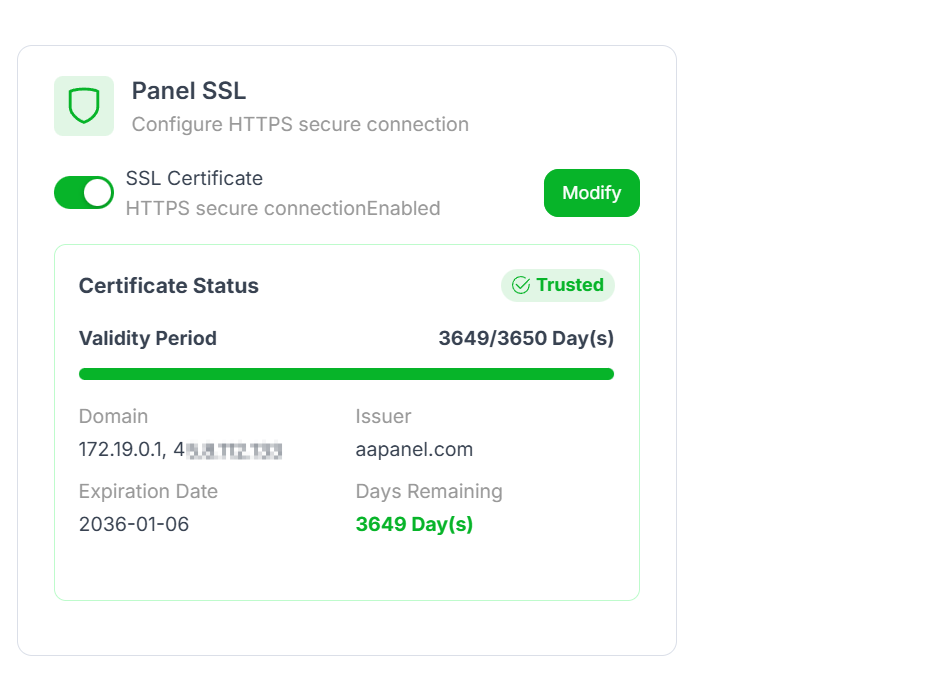
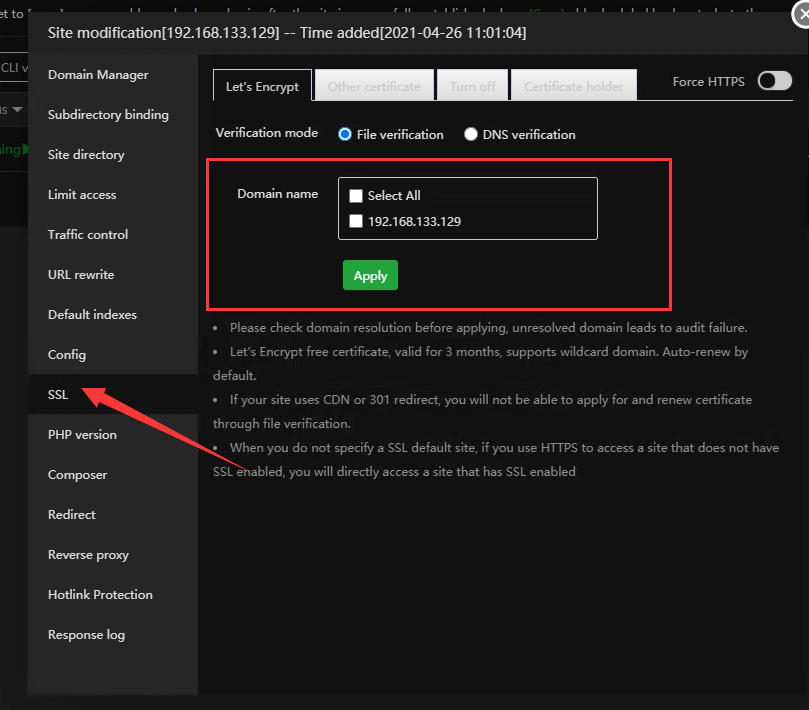
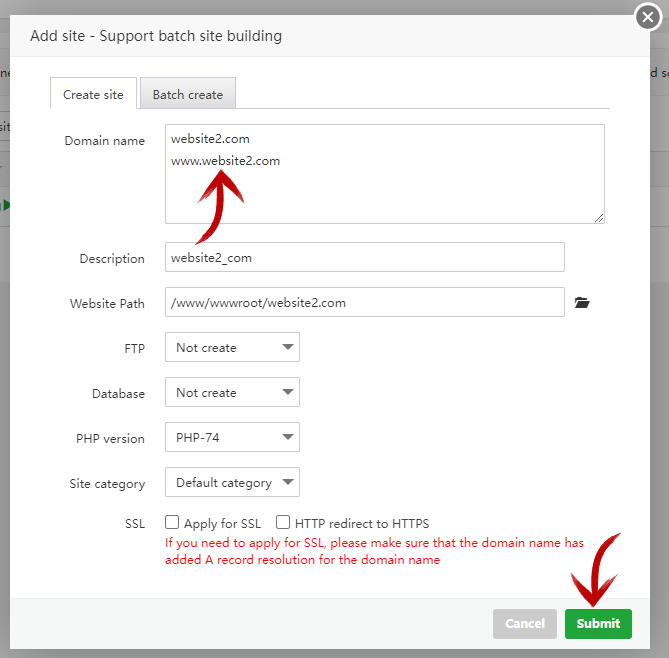
🟢 STEP 2: Install SSL for mail.yourdomain.com
4
Inside aaPanel:
Go to Website
Add new site:
$$
mail.yourdomain.com
$$
Go to SSL
Click Let’s Encrypt
Install certificate
Wait for successful issuance.
Now SSL matches the mail hostname.
—
🟢 STEP 3: Set Mail Server Hostname Properly
Inside aaPanel → Mail Server:
Set:
$$
mail.yourdomain.com
$$
Restart mail service.
—
🟢 STEP 4: Configure Reverse DNS (PTR Record)
This is critical for Gmail.
Contact your VPS provider and request:
$$
YOUR_SERVER_IP → mail.yourdomain.com
$$
Then confirm forward DNS matches:
$$
mail.yourdomain.com → YOUR_SERVER_IP
$$
Both must match exactly.
—
🟢 STEP 5: Use Correct Gmail SMTP Settings
When adding account in Gmail:
Outgoing (SMTP)
$$
Server: mail.yourdomain.com
Port: 465
SSL: Yes
Authentication: Required
Username: full email address
Password: mailbox password
$$
Do NOT use:
Port 25
Server IP address
Proxy through Cloudflare
—
🔎 Advanced Checks (If Still Failing)
—
✔ Check Certificate Matches Hostname
Run:
$$
openssl s_client -connect mail.yourdomain.com:465
$$
Verify certificate CN matches mail.yourdomain.com.
—
✔ Ensure Port 465 Is Open
Some VPS providers block ports.
Check:
$$
telnet mail.yourdomain.com 465
$$
If blocked → request port unlock.
—
✔ Verify SPF, DKIM & DMARC
Add DNS records:
SPF
$$
v=spf1 mx a ip4:YOUR_SERVER_IP all
$$
DKIM
Enable inside aaPanel mail settings.
DMARC
$$
v=DMARC1; p=none; rua=mailto:postmaster@yourdomain.com
$$
Without these, Gmail may still distrust your server.
—
⚡ Quick Fix Checklist
| Item | Status |
|---|
| mail A record created | ✅ |
| DNS set to DNS Only | ✅ |
| SSL installed for mail subdomain | ✅ |
| Mail hostname configured | ✅ |
| PTR record set | ✅ |
| Port 465 open | ✅ |
| SPF/DKIM/DMARC added | ✅ |
—
🔥 Why Cloudflare Proxy Breaks SMTP
Cloudflare does NOT proxy mail ports like:
If orange-cloud enabled → SSL errors occur.
Always set mail record to DNS Only.
—
🚀 Best Secure Setup (2026 Recommended)
✔ Let’s Encrypt for main domain
✔ Let’s Encrypt for mail subdomain
✔ Full (Strict) SSL in Cloudflare
✔ Reverse DNS configured
✔ DKIM enabled
✔ Use hostname, never IP
—
#aaPanel #SMTP #GmailFix #Port465 #VPSMail #Cloudflare #SSLError

